
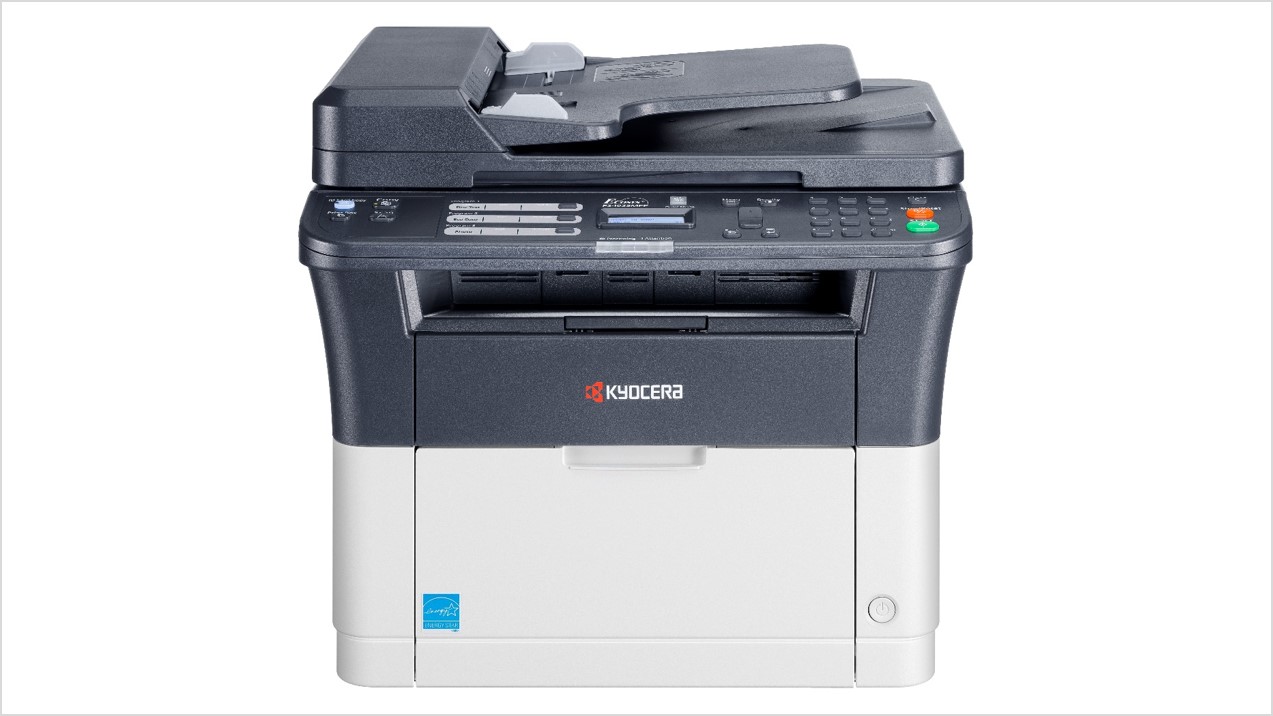
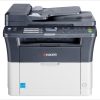
Kyocera ECOSYS FS 1025 Multi Function Laser Printer (1102M63NXV)
KSh 48,000.00 (EX.Vat)
Key features:
1. Print Features
- Print Speed:
- Up to 25 pages per minute (ppm) for A4 size paper.
- Resolution:
- Maximum print resolution of 1200 x 600 dpi for sharp text and images.
- First Print Out Time (FPOT):
- Less than 7.5 seconds for the first page.
- Duplex Printing:
- Manual duplexing (user flips the paper for double-sided printing).
- Monthly Duty Cycle:
- Up to 20,000 pages, suitable for low to medium workloads.
2. Copy Features
- Copy Speed:
- Same as print speed (25 cpm).
- Zoom Range:
- Copy reduction and enlargement between 25% and 400% in 1% increments.
- Maximum Copies:
- Up to 99 copies in a single operation.
3. Scan Features
- Scan Type:
- Color and monochrome scanning using a Flatbed scanner.
- Resolution:
- 600 dpi optical resolution for clear digital scans.
- Scan Modes:
- TWAIN/WIA support for direct PC connection.
- File Formats:
- PDF, JPEG, TIFF, and BMP.
- Scan Functions:
- Direct scan to PC via USB.
4. Paper Handling
- Input Capacity:
- 250-sheet Universal Paper Cassette.
- 1-sheet manual bypass for specialty media.
- Output Capacity:
- 100 sheets face-down.
- Supported Media:
- Standard media types: A4, A5, Letter, Legal, and custom sizes.
- Paperweight: 60 to 220 gsm.
5. Connectivity
- Interface:
- High-Speed USB 2.0 for direct PC connection.
- Optional Network Use:
- Compatible with external print servers for network sharing.
6. Consumables
- Toner Cartridge:
- TK-1120 toner yields up to 3,000 pages (at 5% coverage).
- Drum Life:
- Integrated into the toner cartridge, replaced with the cartridge.
7. Physical Specifications
- Dimensions:
- 390 x 361 x 362 mm (W x D x H).
- Weight:
- Approximately 10.1 kg (22.3 lbs).
- Power Consumption:
- Printing: Approx. 310 W.
- Standby: Approx. 2.2 W.
8. Software and Drivers
- Driver Support:
- Compatible with Windows operating systems.
- Host-Based Printing System (GDI).
- Management Tools:
- Kyocera utilities for monitoring toner and print status.
9. Environmental Features
- Noise Level:
- 49 dB(A) during operation (relatively quiet).
- Power Saving Modes:
- Standby and sleep modes for energy efficiency.
- ECOSYS Technology:
- Long-life components minimize waste and reduce operating costs.
This printer is compact and efficient, offering essential features for light-to-moderate office workloads.
Kyocera ECOSYS FS 1025 Multi Function Laser Printer (1102M63NXV)
The KYOCERA ECOSYS FS-1025 MFP (1102M63NXV) is a compact and efficient multifunction printer designed for small offices or home offices. Its specifications are optimized for cost-effective and reliable performance.
Key Specifications:
- Print Technology: Monochrome Laser
- Functions: Print, Copy, Scan
- Print Speed: Up to 25 pages per minute (A4)
- Print Resolution: 1200 x 600 dpi
- Processor: 360 MHz
- Memory: 256 MB (not expandable)
- Duplex Printing: Manual (not automatic)
- Paper Handling:
- Input Capacity: 250-sheet universal cassette + 1-sheet manual feed.
- Use high-quality A4 paper (80gsm) for best results.
- If printing envelopes or labels, ensure the media meets Kyocera’s specifications to avoid jamming or print quality issues.
- Consumables:
- Toner: TK-1120 (up to 3,000 pages at 5% coverage).
- Always use genuine Kyocera toner to maintain print quality and avoid damage.
- Set the printer to eco mode to extend toner life.
- Driver and Software:
- Install the latest Kyocera drivers and firmware from the official website to ensure compatibility and enhanced performance.
- Use Kyocera’s utilities for efficient management, like KYOCERA Print Center for mobile printing.
- Scanning:
- Resolution: Up to 600 dpi.
- Save scans directly to USB or a connected PC for convenience.
- Use the grayscale option for scanning text to reduce file size.
- Networking:
- Connect via USB 2.0 for direct use or use a print server for network printing.
- If multiple users require access, consider adding an external print server to enable shared printing over LAN.
- Maintenance:
- Clean the printer’s paper path and rollers periodically to avoid jams.
- Replace the drum unit as needed (drum life is tied to the toner cartridge).
- Usage Environment:
- Ensure the printer operates in a temperature range of 10°C to 32.5°C and 20-80% relative humidity for optimal performance.
Ideal Use Case:
The FS-1025 MFP is perfect for small office environments needing moderate printing volumes (around 1,000-2,000 pages per month). While it lacks advanced features like automatic duplexing or wireless connectivity, its cost-effectiveness, durability, and simplicity make it a reliable choice.
If you have additional requirements, such as higher-speed printing, color printing, or wireless features, it may be worth considering other Kyocera models with those capabilities.
Be the first to review “Kyocera ECOSYS FS 1025 Multi Function Laser Printer (1102M63NXV)”
Related products

Kyocera Printers
Kyocera ECOSYS M4132idn A4/A3 Monochrome Multi-functional Printer

Kyocera Printers
Kyocera Ecosys M8124cidn A3/A4 Colour Multifunction Laser Printer
Kyocera Printers
Kyocera Ecosys MA 2000w Multifunctional Monochrome Laser Printer – (Print/Copy/Scan)

Reviews
There are no reviews yet.