

NComputing RX300 Thin Client for vSpace Pro


KSh 32,000.00 (EX.Vat)
- Processor: Quad-core ARM CPU (1.2 GHz) for smooth performance
- Memory: 1 GB RAM for efficient multitasking
- Storage: 8 GB eMMC for quick system access
- Display: HDMI output supporting up to 1920×1200 resolution
- Networking: Gigabit Ethernet (10/100/1000 Mbps) for fast, stable connections
- Wireless: Wi-Fi 802.11 b/g/n and Bluetooth 4.1 for flexible device integration
- USB Ports: 4 USB 2.0 ports for printers, scanners, and peripherals
NComputing RX300 Thin Client for vSpace Pro
The NComputing RX300 is a cloud-ready thin client designed for virtual desktop environments, delivering a seamless PC-like experience with enhanced multimedia support. Built on the Raspberry Pi 3 platform, it provides a cost-effective and energy-efficient solution for businesses and educational institutions.
Product Features
High-Performance Thin Client
Delivers fast, responsive desktop computing powered by vSpace Pro software.
Full HD Multimedia Support
Supports HD video playback and smooth graphics performance for a seamless user experience.
USB Peripheral Connectivity
Includes USB ports for connecting keyboards, mice, printers, and other essential devices.
Energy-Efficient Design
Consumes significantly less power than traditional PCs, reducing energy costs.
Centralized Management
Simplifies IT administration by allowing multiple users to connect to and share a single host system.
Scalable Solution
Ideal for classrooms, call centers, offices, and organizations needing flexible, multi-user computing.
Key Specifications:
- Processor: Quad-core ARM CPU (1.2 GHz) for smooth performance
- Memory: 1 GB RAM for efficient multitasking
- Storage: 8 GB eMMC for quick system access
- Display: HDMI output supporting up to 1920×1200 resolution
- Networking: Gigabit Ethernet (10/100/1000 Mbps) for fast, stable connections
- Wireless: Wi-Fi 802.11 b/g/n and Bluetooth 4.1 for flexible device integration
- USB Ports: 4 USB 2.0 ports for printers, scanners, and peripherals
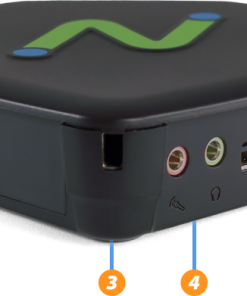
- Audio: Built-in speaker and microphone jacks for clear communication
- Power Supply: 5V/3A USB-C adapter for reliable power
- Compact Size: 93 mm x 30 mm x 76 mm (weighs only 92g), lightweight and easy to mount
Frequently Asked Questions (FAQs):
1.What is the RX300?
The RX300 is a cloud-ready, Wi-Fi-enabled thin client built on the Raspberry Pi 3 platform, optimized for vSpace Pro, VERDE VDI, and Microsoft RDS.
2.What are the key benefits of using the RX300?
The RX300 provides enhanced performance, HD multimedia support, USB redirection, centralized management, advanced streaming, and flexible deployment.
3.Does the RX300 support webcams for video conferencing?
Yes, the RX300 supports webcams via transparent USB redirection.
4.How does the RX300 handle printing in virtual desktop environments?
Printers are supported through transparent USB redirection, enabling seamless printing in vSpace Pro and Microsoft RDS environments.
5.What operating systems are compatible with the RX300?
The RX300 supports Windows and Linux, optimized for vSpace Pro, VERDE VDI, and Microsoft RDS.
6.What is the power consumption of the RX300?
The RX300 consumes less than 5W, making it an energy-efficient solution.
7.Can the RX300 be used in educational settings?
Yes, the RX300 is ideal for schools and SMBs due to easy deployment, centralized management, and affordability.
8.What is the RX300 warranty period?
The warranty varies by region and reseller—check with your NComputing distributor for details.
9.Is the RX300 compatible with third-party virtual desktop solutions?
The RX300 is optimized for vSpace Pro and VERDE VDI. Compatibility with third-party solutions may vary—contact NComputing support for details.
10.How can I manage multiple RX300 devices?
Use vSpace Console to monitor, configure, and manage multiple RX300 devices in real-time.
The NComputing RX300 is a powerful, scalable, and cost-effective thin client, making it perfect for businesses, schools, and remote work environments.
Be the first to review “NComputing RX300 Thin Client for vSpace Pro”
Related products

Electrical Accessories
JAKEMY JM-8125 58-in-1 Professional Hardware Tool Screwdriver Set


Electrical Accessories
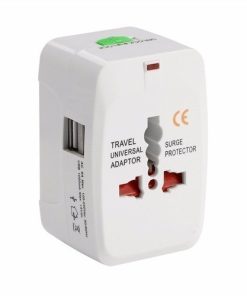
Universal Travel Adapter White US UK EU AU International All-in-one Plug



Electrical Accessories
Universal Travel Adapter with USB Ports US UK EU AU International All-in-one Plug

Reviews
There are no reviews yet.