


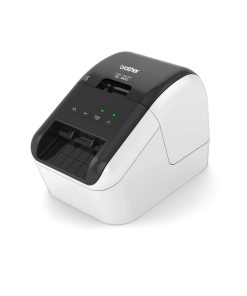


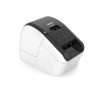
Brother QL-800 Professional Label Printer
Looking for a Brother QL-800 label printer in Kenya for your office, retail shop, warehouse, logistics business or professional labeling requirements? The Brother QL-800 is a high-speed professional direct thermal label printer designed for producing address labels, barcode labels, shipping labels, product labels, file labels and other professional labels.
If you are searching for Brother QL-800 price in Kenya, Brother QL-800 Kenya, or looking to buy Brother QL-800 Kenya, IT Accessories can provide the latest pricing, availability and product support.
Brother QL-800 combines fast label printing, automatic cutting and high-resolution printing in a compact desktop design. It supports Brother DK die-cut labels and continuous-length tapes and can print labels up to 58 mm wide. Brother specifies printing speeds of up to 148 mm/second, with 300 × 300 dpi standard resolution and up to 300 × 600 dpi in high-resolution mode.
Brother QL-800 Label Printer
Brother QL-800 label printer is designed for businesses and professionals who need fast, reliable and convenient desktop label printing.
Using direct thermal technology, the QL-800 does not require conventional ink cartridges. It works with Brother DK label rolls, including die-cut labels and continuous-length tapes.
The printer also features an automatic cutter, making it convenient for producing individual labels or batches of labels.
Key Brother QL-800 Features
- Professional desktop label printer
- Direct thermal printing technology
- Print speeds of up to 148 mm/sec
- Up to 300 × 600 dpi high-resolution printing
- Maximum print width of approximately 62 mm
- Supports Brother DK die-cut labels
- Supports Brother DK continuous-length tapes
- Automatic cutter
- USB connectivity
- Compact desktop design
- Supports black/red printing with compatible DK rolls
- Suitable for address, barcode, shipping and organizational labels
- Plug & Label functionality for convenient label creation
Brother’s specifications confirm that the QL-800 supports USB connectivity, direct thermal printing, a maximum print width of 58 mm and automatic cutting.
Brother QL-800 Price in Kenya
Brother QL-800 price in Kenya depends on availability, configuration and current supply conditions.
If you are searching for the Brother QL-800 price, Brother QL-800 price in Kenya, or Brother QL-800 label printer Kenya, contact IT Accessories for the latest price and availability.
We can also help you identify the appropriate Brother DK labels for your application.
Buy Brother QL-800 Kenya from IT Accessories
Looking to buy Brother QL-800 Kenya?
IT Accessories supplies professional printing and labeling solutions for businesses, offices, retailers, warehouses, logistics companies, institutions and technical users.
When you buy the Brother QL-800 label printer from IT Accessories, you can also source compatible Brother DK labels and other labeling consumables.
Contact IT Accessories for:
- Brother QL-800 pricing
- Product availability
- Brother DK labels
- Label printer recommendations
- Business and office labeling solutions
- Technical product guidance
Brother QL-800 Labels Kenya
QL-800 uses Brother DK labels, including pre-sized die-cut labels and continuous-length tapes.
Common applications include address labels, shipping labels, barcode labels, product identification labels, file labels and organizational labels.
If you are searching for Brother QL-800 labels Kenya, make sure you select a Brother DK roll that matches your required label width and application.
Brother QL-800 DK Labels Kenya
Brother QL-800 DK labels Kenya range includes different sizes and formats for professional labeling applications.
Depending on your requirements, you can use DK labels for:
- Address labels
- Shipping labels
- Barcode labels
- Product labels
- File and folder labels
- Shelf labels
- Inventory labels
- Asset identification
- Packaging labels
- Office organization
QL-800 supports DK die-cut labels and continuous-length tapes, giving users flexibility when selecting label formats.
Brother QL-800 Thermal Label Printer
Brother QL-800 thermal label printer uses direct thermal technology to create labels without conventional ink cartridges.
This makes the printer particularly convenient for businesses that regularly print address, shipping, barcode and identification labels.
With print speeds of up to 148 mm/sec and a maximum print width of approximately 58 mm, the QL-800 is designed for efficient desktop label production.
Brother QL-800 can also be searched for as a Brother QL-800 label maker Kenya. Unlike small handheld label makers, however, the QL-800 is designed as a professional desktop label printer for higher-volume business labeling.
It is particularly suitable where users need to print multiple labels quickly from a computer and want automatic label cutting.
Applications of Brother QL-800
Brother QL-800 is suitable for a wide range of professional labeling applications.
- Office Labeling
Use the QL-800 to create:
- File labels
- Folder labels
- Address labels
- Cabinet labels
- Storage labels
- Equipment labels
- Mailing labels
It can help offices improve organization and identification of documents and equipment.
- Shipping & Logistics
The QL-800 is suitable for producing shipping and address labels for businesses handling deliveries and packages.
Applications include:
- Shipping labels
- Address labels
- Package identification
- Delivery labels
- Customer address labels
- Retail
Retail businesses can use the QL-800 for:
- Product labels
- Barcode labels
- Shelf identification
- Stock labels
- Packaging labels
- Price-related labeling
- Warehousing & Inventory
The printer can support warehouse identification and inventory organization through labels for:
- Stock
- Boxes
- Shelves
- Storage bins
- Products
- Inventory locations
- IT & Networking
QL-800 can be useful for IT environments requiring professional identification labels for:
- Network equipment
- Cables
- Patch panels
- Routers
- Switches
- Servers
- Equipment assets
For specialized cable identification requiring handheld operation and specialized tape types, a Brother P-touch industrial model may be more appropriate.
- Healthcare & Institutions
The QL-800 can be used for appropriate administrative labeling applications such as:
- Files
- Folders
- Storage
- Equipment
- Packages
- Administrative records
Always select label media appropriate for the specific application.
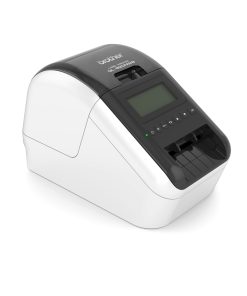
Brother QL-800 vs QL-820NWB
If you are deciding between the Brother QL-800 and Brother QL-820NWB, the main difference is connectivity and advanced functionality.
QL-800 is a straightforward USB-connected professional label printer with speeds up to 148 mm/sec. The QL-820NWB increases printing speed to up to 176 mm/sec and adds Wi-Fi, wired Ethernet and Bluetooth connectivity.
| Feature | Brother QL-800 | Brother QL-820NWB |
| Printing technology | Direct thermal | Direct thermal |
| Standard resolution | 300 × 300 dpi | 300 × 300 dpi |
| High resolution | Up to 300 × 600 dpi | Up to 300 × 600 dpi |
| Max. print width | 58 mm | 58 mm |
| Print speed | Up to 148 mm/sec | Up to 176 mm/sec |
| USB | Yes | Yes |
| Wi-Fi | No | Yes |
| Ethernet/LAN | No | Yes |
| Bluetooth | No | Yes |
| Automatic cutter | Yes | Yes |
| DK labels | Yes | Yes |
| Best suited for | USB desktop labeling | Networked/mobile professional labeling |
QL-820NWB specifications confirm Wi-Fi, Ethernet and Bluetooth connectivity, while the QL-800 specification lists USB as its interface.
Which One Should You Buy?
Choose Brother QL-800 if you primarily need a reliable desktop label printer connected directly to a computer through USB and want an economical professional labeling solution.
Choose Brother QL-820NWB if your business requires wireless printing, Ethernet networking, Bluetooth connectivity or higher print speeds.
For a simple office or workstation setup, the QL-800 can be an excellent choice. For multiple users, networked environments or mobile workflows, the QL-820NWB offers greater connectivity flexibility.
Why Buy Brother QL-800 from IT Accessories Kenya?
Looking for a reliable supplier when you buy Brother QL-800 Kenya?
Choose IT Accessories for your Brother label printing requirements.
We supply technology, printing and labeling solutions to businesses, offices, institutions, retailers, warehouses and professional users in Kenya.
Why choose IT Accessories?
- Kenya-based technology supplier
- Nairobi location
- Professional product guidance
- Brother label printer solutions
- Brother DK labels and consumables
- Competitive pricing
- Support in selecting the right labeling solution
- Suitable solutions for offices and businesses
Brother QL-800 Price & Ordering in Kenya
For the latest Brother QL-800 price in Kenya, product availability and Brother DK label options, contact IT Accessories.
IT Accessories Kenya
Location: Town House Building, 6th Floor, Room 606, Nairobi, Kenya
Email: sales@itaccessories.co.ke
Phone: +254 (0) 780 303 054
Buy Brother QL-800 Kenya from IT Accessories and get a professional desktop label printer for efficient address, shipping, barcode and business labeling.
Frequently Asked Questions About Brother QL-800
- What is the Brother QL-800?
The Brother QL-800 is a professional desktop direct thermal label printer designed for producing address, shipping, barcode, product and organizational labels.
- How much is Brother QL-800 in Kenya?
Brother QL-800 price in Kenya varies depending on current availability and supply conditions. Contact IT Accessories for the latest Brother QL-800 price and quotation.
- Where can I buy Brother QL-800 in Kenya?
You can buy Brother QL-800 Kenya from IT Accessories. We are located at Town House Building, 6th Floor, Room 606, Nairobi.
- Is Brother QL-800 a thermal label printer?
Yes. The Brother QL-800 thermal label printer uses direct thermal printing technology. It does not require conventional ink cartridges.
- What labels does Brother QL-800 use?
QL-800 uses Brother DK labels, including die-cut labels and continuous-length DK tapes.
- Where can I buy Brother QL-800 labels in Kenya?
Contact IT Accessories for Brother QL-800 labels Kenya, including compatible Brother DK label rolls and tapes, subject to availability.
- Can Brother QL-800 print barcodes?
Yes. QL-800 can print barcode labels when used with compatible software such as Brother P-touch Editor. Brother’s documentation lists support for a range of barcode symbologies through P-touch Editor.
- Can Brother QL-800 print shipping labels?
Yes. QL-800 is suitable for address and shipping label applications when the appropriate DK label size is used.
- What is the maximum printing width of Brother QL-800?
QL-800 has a maximum print width of approximately 62 mm and supports compatible DK media.
- How fast does Brother QL-800 print?
Brother QL-800 can print at speeds of up to 148 mm per second for single-colour printing under specified conditions.
- Does Brother QL-800 print in colour?
QL-800 supports two-colour black and red printing when used with compatible black/red-on-white DK media. Two-colour printing is slower than standard single-colour printing.
- Does Brother QL-800 have Wi-Fi?
No. QL-800 is primarily a USB-connected model. If you need Wi-Fi, Ethernet and Bluetooth connectivity, consider the Brother QL-820NWB.
- What is the difference between Brother QL-800 and QL-820NWB?
QL-800 is a USB desktop label printer with speeds up to 148 mm/sec, while the QL-820NWB adds Wi-Fi, Ethernet and Bluetooth and can print at up to 176 mm/sec. Both support direct thermal printing and a maximum print width of 62 mm.
- Is Brother QL-800 good for office use?
Yes. It is suitable for office address labels, file labels, folder labels, storage labels, equipment identification and other everyday professional labeling requirements.
- Is Brother QL-800 suitable for a warehouse?
Yes, particularly for desktop-level inventory, address, product and identification labeling. For very high-volume industrial warehouse operations, a dedicated industrial barcode printer may be more appropriate.
- Does Brother QL-800 require ink?
No. QL-800 uses direct thermal printing, so it does not use conventional ink cartridges. It requires compatible Brother DK thermal label media.
- Where can I get Brother QL-800 price and availability in Nairobi?
Contact IT Accessories at +254 (0) 780 303 054 or email sales@itaccessories.co.ke for the latest Brother QL-800 price and availability.
- Why buy Brother QL-800 from IT Accessories?
IT Accessories provides professional labeling and printing solutions for businesses and organizations in Kenya. We can assist with the Brother QL-800, compatible DK labels and choosing the appropriate Brother label printer for your application.
IT Accessories Kenya
Town House Building, 6th Floor, Room 606, Nairobi
Email: sales@itaccessories.co.ke
Phone: +254 (0) 780 303 054





Reviews
There are no reviews yet.