
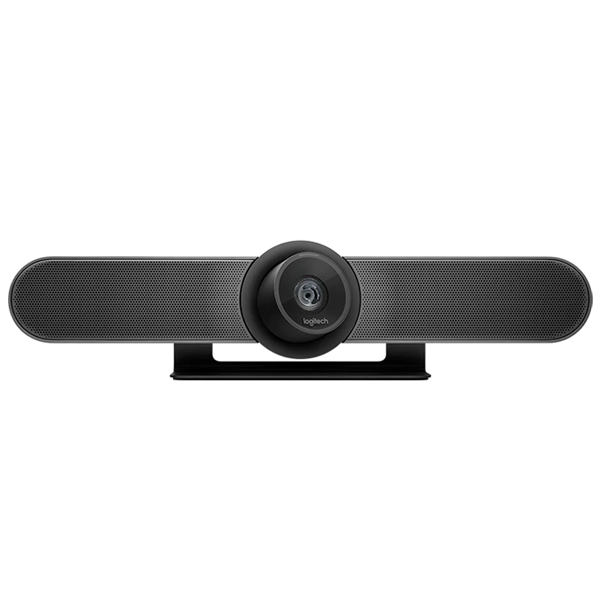
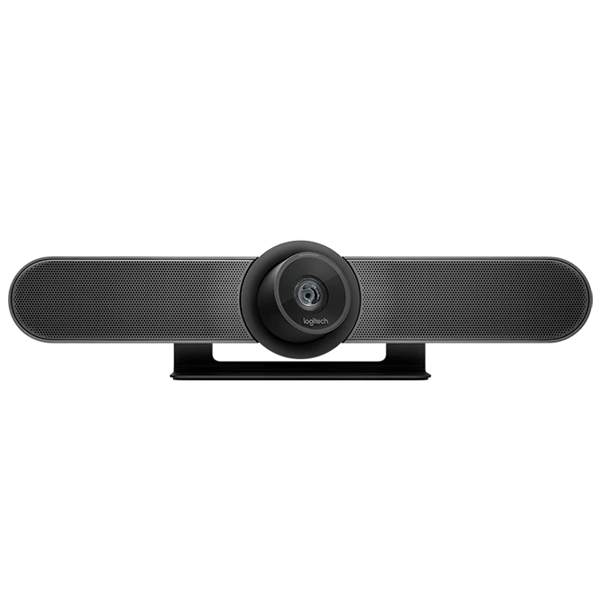

Logitech Meetup Video Conference Camera (960-001102)


KSh 77,000.00 (EX.Vat)
Key Features of the Logitech Meetup Video Conference Camera (960-001102):
Camera and Video Quality
- Ultra-Wide 120° Field of View: Covers a broad area, perfect for small huddle rooms where people are seated close to the camera.
- 4K Ultra HD Image Sensor: Ensures sharp, clear video even when zoomed in, supporting resolutions up to 4K.
- 5x HD Digital Zoom: Provides close-up clarity for presenters, whiteboards, and other meeting materials without compromising image quality.
- Premium Optics: Prevents the fisheye effect, keeping faces and objects in their natural proportions and maintaining straight lines for clear visibility.
Audio System
- Beamforming Microphone Array: Integrated mics focus on voices in the room, reducing background noise and echo for clear audio.
- RightSound Technology: Auto-levels voices, suppresses background noise, and enhances conversational clarity.
- Expandable Audio Range: Compatible with an optional Logitech Expansion Mic, extending audio coverage from 4 to 5 meters.
- Bluetooth Speakerphone Capability: Enables connection with a smartphone or tablet, turning the Meetup into a high-quality speakerphone for audio calls.
Smart Features
- RightSight Computer Vision: Automatically frames participants by adjusting the camera’s pan, tilt, and zoom based on the room layout.
- RightLight Technology: Adjusts lighting in real-time to optimize skin tones and visibility, even in challenging lighting conditions.
Control and Connectivity
- RF Remote Control: Allows discreet control over volume, mute, and camera settings from anywhere in the room, without line-of-sight requirements.
- Logi Remote App: Provides remote control capability from an iPhone or iPad for convenience.
- USB Plug-and-Play: Simple setup through USB connectivity, compatible with a wide range of video conferencing platforms like Zoom, Microsoft Teams, Google Meet, and more.
Design and Installation
- Compact, All-in-One Design: Integrates the camera, mics, and speaker into a single device for a streamlined setup.
- Multiple Mounting Options: Can be mounted on a table, wall, or display using an optional TV mount with VESA compatibility.
- Privacy Assurance: LED status light indicates when the microphone is muted, ensuring privacy during meetings.
These features make the Logitech Meetup an ideal solution for clear, high-quality video and audio in compact meeting spaces.
Logitech Meetup Video Conference Camera (960-001102) Specifications
Overview
The Logitech Meetup Video Conference Camera is a premium video conferencing solution designed for small to medium-sized meeting rooms. Offering both high-quality video and audio, it features Logitech’s RightSense technologies to automatically adjust to lighting, sound, and room conditions, ensuring that every meeting is seamless and efficient.
Key Technical Specifications
Camera
- Resolution: Ultra-HD 4K for crystal-clear video quality
- Field of View: 120° diagonal, ideal for capturing everyone in small to medium rooms without distortion
- Zoom: 5x digital zoom, maintaining clarity even in close-ups, supported by an advanced 4K image sensor
- Pan & Tilt: Motorized controls for easy framing and adjustments
- Optics: Premium lens designed to avoid distortion (no fish-eye effect), ensuring natural-looking faces and clear content like whiteboards
Audio
- Integrated Microphone: 3 beamforming mic elements to focus on voices, suppress noise, and auto-level speech for clear audio across the room
- Audio Range: Optimized for up to 4 meters, with optional Expansion Mic extending the range to 5 meters
- RightSound Technology: Auto-adjusts audio for clarity, suppressing background noise and leveling voice volume
- Bluetooth Speakerphone: Allows pairing with smartphones for high-quality audio calls, enhancing mobile conferencing
RightSense Technologies
- RightSound: Improves vocal clarity by automatically adjusting audio levels and reducing background noise
- RightSight: Automatically adjusts the camera’s pan, tilt, and zoom to frame all participants, ensuring no one is left out of the picture
- RightLight: Adjusts the lighting to enhance facial features, even in dim or challenging lighting conditions
Connectivity
- USB Connectivity: Plug-and-play setup via USB, making it easy to use with any compatible conferencing software
- Bluetooth: Supports wireless pairing with mobile devices for audio streaming
- Compatibility: Certified for Skype for Business, ready for Microsoft Teams, and compatible with Zoom, Google Meet, BlueJeans, and other USB video conferencing platforms
Remote Control
- Type: RF (Radio Frequency) remote control for discreet operation without needing line-of-sight
- App Control: Control the camera from your iPhone or iPad with the free Logi Remote app (available on iOS)
Mounting Options
- TV Mount: VESA-compatible TV mount (optional) allows for positioning the Meetup above or below a display without drilling new holes
- Dimensions: Compact design fits easily in meeting rooms with minimal space
Expansion Options
- Expansion Mic: Optional microphone extends the audio range from 4 meters to 5 meters, ideal for larger huddle rooms
Product Highlights
- High-Quality Video: 4K resolution, wide 120° field of view, and 5x digital zoom with premium optics for sharp, clear images
- Advanced Audio: Beamforming microphones, RightSound technology, and an optional Expansion Mic for extended audio coverage
- Smart Features: RightSight for auto-framing, RightLight for optimal lighting, and Bluetooth connectivity for mobile devices
- Convenient Control: RF remote control and Logi Remote app for easy operation anywhere in the room
Inside the Box
- Logitech Meetup Camera
- Power Adapter with regional plugs
- RF Remote Control
- USB-C Cable
- Optional Accessories: Expansion Mic and TV Mount (available separately)
Logitech Meetup Video Conference Camera (960-001102) – FAQs
- What is the Logitech Meetup Camera best suited for?
The Logitech Meetup is ideal for small to medium-sized conference rooms and huddle spaces, offering high-quality video and integrated audio for up to 4 meters. - What are the RightSense technologies, and how do they improve video calls?
- RightLight: Adjusts lighting for clearer face visibility in various lighting conditions.
- RightSight: Auto-adjusts the camera to frame all participants.
- RightSound: Optimizes voice clarity by reducing background noise and adjusting voice levels.
- Can I expand the audio range of the Meetup Camera?
Yes, adding the Expansion Mic extends the audio range from 4 meters to 5 meters, covering larger spaces. - How do I connect the Logitech Meetup Camera to my computer?
The Meetup Camera connects via USB, offering plug-and-play simplicity with most video conferencing software. - Which video conferencing platforms is the Meetup Camera compatible with?
It’s certified for Skype for Business, Microsoft Teams, Zoom, Google Meet, BlueJeans, and more. - Can I use the Meetup Camera as a Bluetooth speakerphone?
Yes, you can pair the Meetup Camera with a smartphone or tablet for Bluetooth audio conferencing. - What is the field of view, and can the camera zoom?
The camera has a 120° diagonal field of view and features 5x digital zoom for closer views. - How can I control the camera position and settings?
Use the included RF remote or the free Logi Remote app to control pan, tilt, zoom, volume, and mute. - Does the Meetup Camera support mounting options?
Yes, it can be mounted on a wall or TV, and the optional TV mount allows easy positioning above or below a display. - How many people can the Logitech Meetup accommodate in a meeting room?
The system works well for up to 6-8 people when using the Expansion Mic, covering up to 5 meters. - How is privacy ensured during video meetings?
The camera has a LED status ring that turns red when muted, ensuring privacy during meetings. - What’s included in the box with the Logitech Meetup?
The box includes the Meetup Camera, power adapter, RF remote control, and USB-C cable. Optional accessories like the Expansion Mic and TV Mount are sold separately.
This detailed and optimized overview makes the Logitech Meetup a powerful and versatile solution for high-quality video conferencing in smaller rooms.
Be the first to review “Logitech Meetup Video Conference Camera (960-001102)”
Related products



Logitech Accessories
Logitech MX Keys Mini For Mac Bluetooth Illuminated Keyboard – Pale Gray – 920-010526


Logitech Accessories
Logitech Wireless Keyboard with touchPad K400 Plus – Black – 920-007145


Logitech Accessories
Logitech Zone Wired Headset with Noise-Cancelling Mic (UC version) -981-000875


Logitech Accessories
Logitech H390 USB Headset with Noise-Canceling Mic (981-000406)


Reviews
There are no reviews yet.