

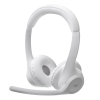
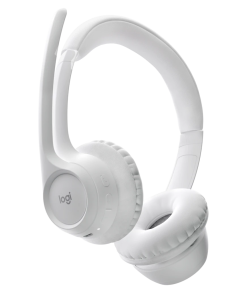
Logitech Zone Wired Headset with Noise-Cancelling Mic (UC version) -981-000875

KSh 16,500.00 (EX.Vat)
Key Features
- Premium Audio Quality: 40mm drivers deliver rich bass and crisp highs for an immersive sound experience, ideal for calls and music.
- Noise-Cancelling Microphone: Dual microphones (uni-directional and omni-directional) effectively reduce background noise, ensuring clear communication.
- Flip-to-Mute Mic: Conveniently mute the microphone by rotating the boom, offering quick control during calls.
- Comfortable Design: Memory foam ear cushions with protein leatherette provide passive noise isolation and long-lasting comfort.
- In-Line Controls: Easily adjust volume, mute/unmute, and manage calls directly from the headset for seamless communication.
- USB-C Connectivity: Reliable wired connection with USB-C, plus included USB-A adapter for versatile compatibility.
- Certified for UC Platforms: Works with Microsoft Teams, Zoom, Google Meet, and other popular communication platforms.
- Adjustable Mic Boom: 270° flexible mic boom for left or right-side wear, ensuring the perfect fit.
- LED Indicators: Visual mute status and call activity indicators for easy management.
- Wide Device Compatibility: Works with Windows, macOS, and Chrome OS devices, making it a versatile choice for any setup.
Logitech Zone Wired Headset with Noise-Cancelling Mic (UC Version) – 981-000875
The Logitech Zone Wired Headset (UC Version) is designed to provide exceptional audio and clear communication, making it perfect for professional environments like open offices and virtual meetings.
Key Specifications:
Audio Performance
- 40mm Drivers: Full-bodied bass and crisp highs for clear calls and music.
- Microphone:
- Dual microphones (uni-directional and omni-directional) effectively reduce background noise.
- Frequency Response: 100Hz to 16kHz
- Sensitivity:
- Main Mic: -48 dBV/Pa
- Secondary Mic: -40 dBV/Pa
Connectivity
- Connection: Wired USB-C for stable and high-quality audio.
- Adapter: Includes USB-A adapter for compatibility with a wide range of devices.
Design and Comfort
- Weight: 211 grams for lightweight comfort.
- Dimensions: 165.93 x 179.73 x 66.77 mm
- Cable Length: 6.23 ft for flexible movement.
- Ear Cushions: Memory foam with protein leatherette, offering passive noise isolation up to 12dB.
- Adjustability: Flexible mic boom rotates 270° for left or right-side wear.
Controls and Features
- In-Line Controls: Easily adjust volume, mute/unmute, and manage calls from the headset.
- Flip-to-Mute Mic: Quickly mute the mic by flipping the boom.
- LED Indicators: Visual indicators show mute status and call activity.
Compatibility
- Certified for UC platforms: Works with Microsoft Teams, Zoom, Google Meet, and more.
- Compatible with: Windows, macOS, and Chrome OS devices.
Included Accessories
- USB-A adapter
- Travel bag for easy portability
- User documentation
The Logitech Zone Wired Headset offers premium sound and noise cancellation, providing a distraction-free experience during calls and meetings.
FAQs
1. Is the Logitech Zone Wired Headset compatible with all devices?
Yes, it’s compatible with Windows, macOS, Chrome OS, and works with UC platforms like Microsoft Teams, Zoom, and Google Meet.
2. Can I use the headset with my smartphone?
It requires a USB-C connection or an additional adapter for compatibility with devices that don’t support USB-C.
3. What is the benefit of the flip-to-mute mic?
Quickly mute the mic during calls by flipping the boom, allowing you to manage your audio without pressing a button.
4. How does the noise-cancelling microphone work?
The dual microphones reduce background noise, ensuring that your voice is clear and distinct, even in noisy environments.
5. Can I wear the headset on either side?
Yes, the mic boom rotates 270° for comfortable wear on either side.
6. What is the cable length?
The cable is 6.23 ft (1.9 meters), offering flexibility for desk setups and movement.
7. Does the headset come with accessories?
Yes, it includes a USB-A adapter, travel bag, and user documentation.
8. How do I control volume or mute the headset?
The in-line controls on the headset let you easily adjust the volume, mute/unmute, and manage calls.
9. Can I use the headset for both music and calls?
Yes, it delivers high-quality sound for both music and calls, thanks to the 40mm drivers.
10. How does the noise isolation work?
Memory foam ear cushions provide passive noise isolation, reducing background distractions for a more focused and clear audio experience.
Be the first to review “Logitech Zone Wired Headset with Noise-Cancelling Mic (UC version) -981-000875”
Related products

Logitech Accessories
Logitech H390 USB Headset with Noise-Canceling Mic (981-000406)


Logitech Accessories
Logitech MK470 Slim Wireless Keyboard and Mouse Combo – 920-009204


Logitech Accessories
Logitech H340 USB Headset with Noise-Cancelling Mic (981-000475)


Logitech Accessories
Logitech Zone 300 Wireless Bluetooth Over Ear Headset with Noise-Cancelling Microphone (981-001407)


Reviews
There are no reviews yet.