
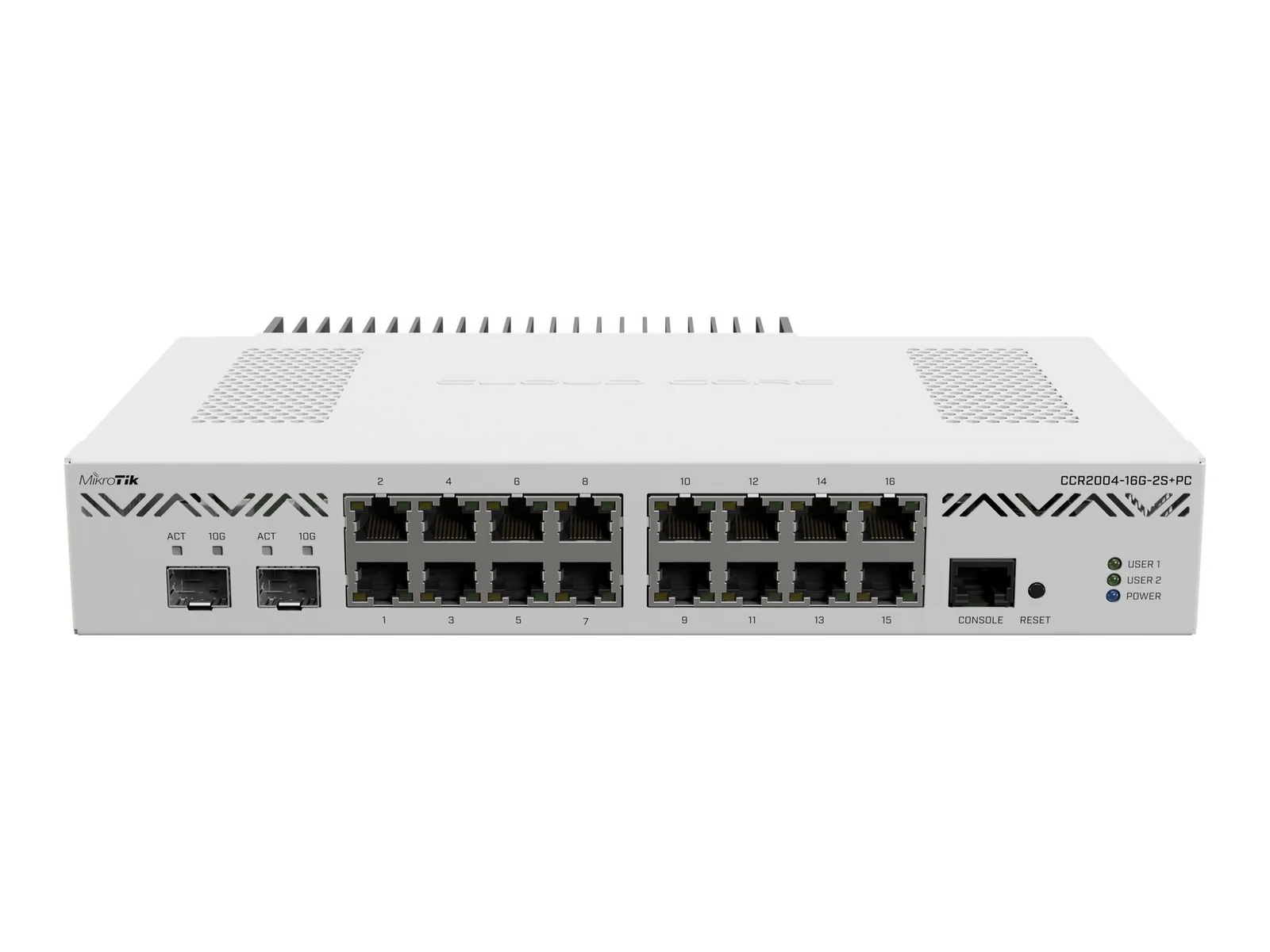


Mikrotik CCR2004-16G-2S+PC Gigabit Router


KSh 75,000.00 (EX.Vat)
Key Features of MikroTik CCR2004-16G-2S+PC Router
1. High Performance
- 16-core ARM Cortex-A72 CPU running at 2.2 GHz per core, ensuring seamless performance for demanding applications.
- 3.2 Tbps routing throughput and 6.4 Tbps switching capacity for high-speed data processing.
2. Extensive Connectivity
- 16x Gigabit Ethernet ports for flexible LAN/WAN connections.
- 2x 10G SFP+ ports for high-speed fiber or uplink connections.
3. Reliable Design
- Redundant dual power supplies (500W AC) for uninterrupted operation.
- Efficient cooling system and robust hardware for maximum uptime.
4. Advanced Networking Features
- Built-in hotspot management with user authentication, bandwidth control, and traffic shaping.
- Supports advanced routing protocols like BGP, OSPF, and MPLS.
- Comprehensive firewall and security tools, including VPN (PPTP, L2TP, IPsec, OpenVPN).
5. Scalability and Flexibility
- VLAN support for network segmentation.
- Queue Trees and QoS for bandwidth prioritization and traffic shaping.
- Compatible with RADIUS and external API integration for user management.
6. Easy Management
- Powered by MikroTik’s RouterOS with features like scripting, automation, and monitoring.
- Supports real-time monitoring via SNMP, The Dude, or web interfaces.
7. Compact Form Factor
- 1U rackmount design, ideal for data centers and enterprise installations.
8. Cost-Effective Solution
- High performance at a competitive price, making it ideal for ISPs, large hotspots, and enterprises.
The CCR2004-16G-2S+PC is a reliable, scalable, and powerful router tailored for demanding network environments.
MikroTik CCR2004-16G-2S+PC Router
Key Specifications
| Feature | Details |
|---|---|
| CPU | 16-core ARM Cortex-A72 @ 2.2 GHz per core |
| RAM | 8 GB DDR4 RAM |
| Storage | 256 MB NAND Flash (RouterOS pre-installed) |
| Ethernet Ports | 16x Gigabit Ethernet ports |
| SFP+ Ports | 2x 10G SFP+ ports |
| Routing Performance | Up to 3.2 Tbps forwarding capacity |
| Switching Capacity | 6.4 Tbps |
| Power Supply | Redundant 500W AC power supplies |
| Dimensions | 1U Rackmount, 430 x 440 x 43 mm |
| Operating Temperature | 0°C to +40°C |
| Compliance | CE, FCC, RoHS certified |
Hardware Features
- Powerful Processing:
- CPU: Equipped with a 16-core ARM Cortex-A72 processor running at 2.2 GHz, the CCR2004-16G-2S+PC provides ample processing power to handle high volumes of simultaneous connections and complex routing tasks inherent in large hotspot environments.
- Performance: Capable of up to 3.2 Tbps routing throughput and 6.4 Tbps switching capacity, ensuring that data flow remains smooth even under heavy load.
- High Connectivity:
- Gigabit Ethernet Ports: 16x Gigabit ports offer extensive connectivity options for both LAN and WAN interfaces, allowing for flexible network topologies and high device density.
- 10G SFP+ Ports: 2x 10G SFP+ ports support high-speed uplinks and can be used for fiber connections, providing future-proof scalability and increased bandwidth for backbone links.
- Memory and Storage:
- RAM: 8 GB DDR4 RAM ensures efficient handling of numerous concurrent sessions, essential for maintaining performance with over 500 hotspot clients.
- Storage: 256 MB NAND flash provides reliable storage for RouterOS and configuration files, with options for external storage expansion if needed.
- Redundancy and Reliability:
- Power Supply: Dual redundant 500W AC power supplies ensure uninterrupted operation, critical for maintaining hotspot availability.
- Cooling: Efficient cooling systems maintain optimal operating temperatures, enhancing hardware longevity and reliability.
- Form Factor:
- Rackmount Design: 1U rackmount form factor allows for easy integration into standard server racks, making it suitable for both data centers and large-scale network installations.
Software Features
- RouterOS:
- Comprehensive Routing: Advanced routing protocols (BGP, OSPF, etc.) ensure efficient path selection and network stability.
- Hotspot Management: Built-in hotspot functionality supports user authentication, billing, and access control, essential for managing large numbers of clients.
- User Authentication: Supports various authentication methods, including RADIUS, voucher-based systems, and captive portals.
- Bandwidth Management: Quality of Service (QoS), traffic shaping, and bandwidth throttling ensure fair resource distribution among clients.
- Security Features: Firewall, VPN, and intrusion detection/prevention systems safeguard the network against unauthorized access and threats.
- Scalability:
- Scripting and Automation: RouterOS allows for automation of routine tasks, configuration backups, and dynamic adjustments based on network conditions.
- API and Integration: APIs facilitate integration with external management systems and third-party applications for enhanced network management.
- Monitoring and Reporting:
- Real-Time Monitoring: Tools for monitoring traffic, user sessions, and network performance in real-time.
- Detailed Reporting: Generate reports on user activity, bandwidth usage, and system performance to aid in network optimization and troubleshooting.
Optimization for Handling 500+ Hotspot Clients
To ensure that the CCR2004-16G-2S+PC operates efficiently with over 500 hotspot clients, consider the following optimization strategies:
1. Hardware Configuration
- RAM Allocation: Ensure that sufficient RAM is allocated to handle the expected number of concurrent sessions. With 8 GB DDR4 RAM, the CCR2004 can efficiently manage 500+ clients, but monitor memory usage and consider upgrades if necessary.
- CPU Utilization: Distribute processing tasks effectively across the 16 cores to prevent bottlenecks. Utilize RouterOS’s ability to handle multi-core processing for simultaneous tasks like authentication, traffic shaping, and routing.
2. RouterOS Configuration
- Hotspot Setup:
- User Pools: Define user pools with appropriate IP ranges to prevent IP exhaustion.
- Session Limits: Configure session timeouts and maximum session durations to optimize resource usage.
- Authentication: Implement scalable authentication methods like RADIUS for centralized user management.
- Bandwidth Management:
- Queue Trees: Use queue trees to prioritize critical traffic and ensure fair bandwidth distribution among clients.
- Limiters: Set bandwidth limits per user or per group to prevent any single user from monopolizing resources.
- Firewall and Security:
- Efficient Rules: Optimize firewall rules to minimize processing overhead. Use ordered rules with the most frequently matched rules first.
- NAT Configuration: Implement Network Address Translation (NAT) efficiently to handle high volumes of traffic without latency.
3. Network Design
- VLAN Segmentation: Use VLANs to segment traffic logically, reducing broadcast domains and improving overall network performance.
- Link Aggregation: Implement Link Aggregation Control Protocol (LACP) on Gigabit and 10G ports to increase bandwidth and provide redundancy.
- Load Balancing: Distribute traffic across multiple WAN links if available, ensuring high availability and better load management.
4. Monitoring and Maintenance
- Real-Time Monitoring: Utilize tools like The Dude or SNMP to monitor network performance, identify bottlenecks, and proactively address issues.
- Regular Updates: Keep RouterOS updated to the latest stable version to benefit from performance improvements, security patches, and new features.
- Log Management: Configure logging to capture essential events without overloading the system. Use external logging servers if necessary.
5. Redundancy and Failover
- High Availability (HA): Implement HA configurations using VRRP or similar protocols to ensure network continuity in case of hardware failures.
- Backup Configurations: Regularly back up configurations and store them securely to facilitate quick recovery in case of system failures.
Why Choose CCR2004-16G-2S+PC for Large Hotspot Deployments
- Performance: The 16-core ARM Cortex-A72 processor and 8 GB RAM provide the necessary horsepower to manage over 500 hotspot clients without compromising on speed or reliability.
- Scalability: With 16 Gigabit Ethernet ports and 2x10G SFP+ ports, the CCR2004 offers extensive connectivity options, supporting both current needs and future expansion.
- Reliability: Redundant power supplies and robust build quality ensure that the router remains operational even in demanding environments.
- Advanced Features: Comprehensive RouterOS features cater to complex networking requirements, including advanced hotspot management, security, and traffic optimization.
- Cost-Effectiveness: Compared to higher-end models like the CCR2116 or CCR1072, the CCR2004-16G-2S+PC offers a balanced mix of performance and cost, making it a viable choice for large-scale deployments without excessive expenditure.
Conclusion
The MikroTik CCR2004-16G-2S+PC is a powerful and versatile router well-suited for managing large hotspot environments with over 500 clients. Its robust hardware specifications, combined with MikroTik’s feature-rich RouterOS, ensure that it can handle high user densities, maintain network performance, and provide reliable service. By implementing the optimization strategies outlined above, you can maximize the router’s capabilities and ensure a seamless experience for all hotspot users.
If you anticipate further growth or require additional features, consider exploring higher-end models in the CCR series. However, for most large-scale hotspot deployments, the CCR2004-16G-2S+PC strikes an excellent balance between performance, scalability, and cost.
Frequently Asked Questions For Mikrotik CCR2004-16G-2S+PC Gigabit Router
Q1: What is the primary use case for the CCR2004-16G-2S+PC?
The CCR2004-16G-2S+PC is designed for environments requiring high performance and reliability, such as:
- Large hotspot networks (500+ clients).
- Enterprise networks.
- Internet Service Providers (ISPs).
- Data centers with high routing and switching demands.
Q2: How many clients can this router support?
The CCR2004-16G-2S+PC can comfortably handle 500+ simultaneous clients in hotspot or routing scenarios, depending on the configuration, traffic patterns, and resource usage.
Q3: What is the maximum throughput of the CCR2004-16G-2S+PC?
- Routing Performance: Up to 3.2 Tbps.
- Switching Capacity: Up to 6.4 Tbps.
Actual performance depends on the configuration and traffic types.
Q4: Does the CCR2004-16G-2S+PC support VLANs?
Yes, it supports VLANs for network segmentation, allowing you to separate traffic and manage resources efficiently.
Q5: What operating system does it use?
The router runs on MikroTik’s RouterOS, which offers advanced networking features like routing, hotspot, VPN, and QoS.
Hardware and Connectivity
Q6: What kind of ports are available?
- 16x Gigabit Ethernet Ports for LAN/WAN connections.
- 2x 10G SFP+ Ports for high-speed uplinks or fiber connections.
Q7: Can I use both Ethernet and SFP+ ports simultaneously?
Yes, the router can handle traffic through all ports simultaneously, depending on the configured routing and switching rules.
Q8: Does the router have redundant power supplies?
Yes, the CCR2004-16G-2S+PC has dual redundant 500W AC power supplies, ensuring uninterrupted operation.
Q9: Can it be mounted in a rack?
Yes, it has a 1U rackmount form factor, designed for standard server racks.
Q10: What are the power requirements?
- Input Voltage: 100–240V AC.
- Power redundancy ensures reliability in case of power supply failure.
Hotspot and Network Management
Q11: Does the CCR2004 support hotspot functionality?
Yes, it includes a built-in hotspot server in RouterOS, allowing for:
- User authentication via RADIUS or local database.
- Captive portal setups.
- Bandwidth limiting and traffic shaping.
Q12: How do I manage bandwidth for clients?
You can use RouterOS features like:
- Simple Queues for individual client limits.
- Queue Trees for hierarchical bandwidth control.
- Dynamic IP Pools to assign bandwidth per user group.
Q13: Can the router integrate with external authentication systems?
Yes, it supports RADIUS and external APIs for user authentication and management, commonly used in large-scale hotspot networks.
Configuration and Optimization
Q14: What is the best way to configure the CCR2004 for 500+ hotspot clients?
- Set Up Hotspot Server: Use the RouterOS hotspot feature.
- Use RADIUS Authentication: For scalability and centralized management.
- Implement Bandwidth Shaping: Use Queue Trees for fair bandwidth distribution.
- Optimize Firewall Rules: Keep rules simple and efficient.
- Enable Monitoring: Use tools like SNMP and The Dude for real-time monitoring.
Q15: Does it support load balancing?
Yes, you can configure WAN load balancing using PCC (Per Connection Classifier) or ECMP (Equal Cost Multi-Path) routing.
Q16: Can I use it as a VPN server?
Yes, RouterOS supports various VPN protocols, including:
- PPTP, L2TP, OpenVPN, SSTP, and IPsec.
Maintenance and Support
Q17: How do I update RouterOS?
- Log in to the router via WinBox or WebFig.
- Go to System → Packages → Check for Updates.
- Download and install the latest stable version.
Q18: What should I do if the router overheats?
- Ensure proper airflow around the unit.
- Clean dust from the vents and fans regularly.
- Check for firmware updates, as they can include performance optimizations.
Q19: How do I back up the configuration?
- Use WinBox to log in.
- Navigate to Files → Backup.
- Save the configuration file locally or export it to an external server.
Q20: Where can I find support for MikroTik products?
- MikroTik Forum: forum.mikrotik.com
- Official Support: mikrotik.com/support
- Community resources and documentation are also available on the MikroTik Wiki.
Be the first to review “Mikrotik CCR2004-16G-2S+PC Gigabit Router”
Related products


Networking
Cisco CBS350-24P-4G 24-port PoE+ Gigabit Ethernet Managed Switch with 4 Gigabit SFP Ports


Reviews
There are no reviews yet.