

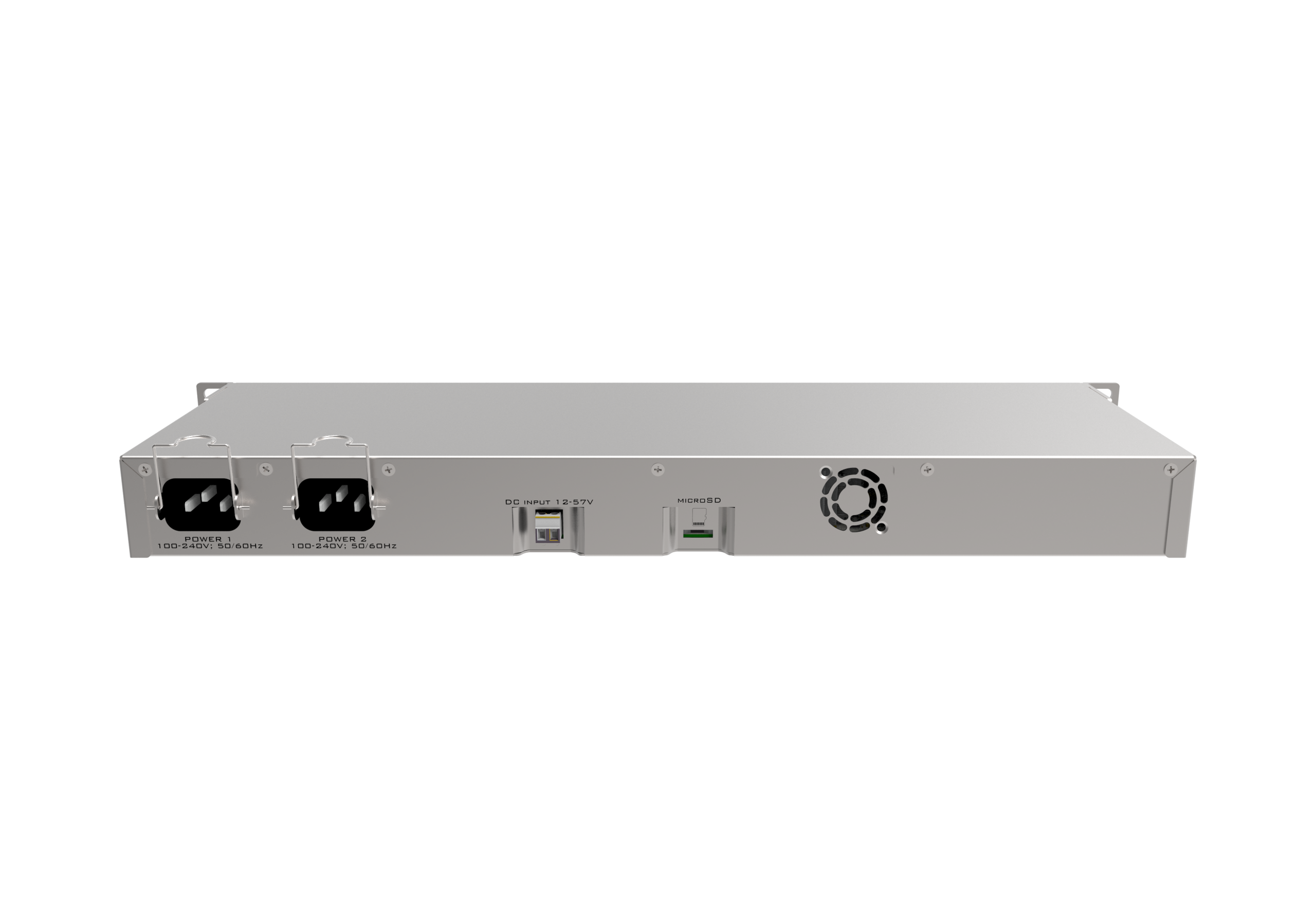


MikroTik RB1100AHx4 Dude Edition Router (RB1100Dx4)


KSh 52,000.00 (EX.Vat)
Key Features of MikroTik RB1100AHx4 Dude Edition (RB1100Dx4)
1. High-Performance Processing
- Powered by a Quad-Core ARM Cortex-A15 CPU (1.4 GHz per core).
- Delivers up to 7.5 Gbps throughput and handles 1.5 million packets per second (PPS) for demanding networking tasks.
2. Integrated Storage
- Pre-installed 60 GB M.2 SSD for:
- The Dude server for network monitoring.
- Web proxy caching and file storage.
3. Extensive Connectivity
- 13x Gigabit Ethernet Ports: Flexible for LAN/WAN configurations.
- 1x USB 3.0 Port: For external storage or 3G/4G modems.
- 1x Serial Console Port (RJ45): For out-of-band management.
4. Advanced Networking Features
- Supports advanced routing protocols: BGP, OSPF, RIP, MPLS, and more.
- Hotspot Server for user authentication, bandwidth control, and captive portal setup.
- Dual-Stack IPv4/IPv6 support for modern networks.
5. Security and VPN Support
- Built-in firewall and NAT for enhanced security.
- Supports VPN protocols like PPTP, L2TP, OpenVPN, SSTP, and IPsec for secure remote access and site-to-site connectivity.
6. Reliable and Redundant Design
- Dual Redundant Power Supplies: Automatic failover ensures continuous operation.
- Passive PoE input on Port 13 (18–57V).
7. VLAN and Switching
- Integrated hardware switch chip for efficient VLAN management and port bridging.
8. Integrated Network Monitoring
- Includes The Dude server for real-time monitoring, network mapping, and alerts.
- Optimized for centralized network management.
9. Rugged Build
- 1U Rackmount Design: Compact and durable, ideal for data centers and enterprise environments.
- Operates in extreme temperatures (-40°C to +70°C).
10. Scalable and Flexible
- Handles up to 300–500 users in typical configurations.
- Ideal for small ISPs, branch offices, and enterprise networks.
The MikroTik RB1100AHx4 Dude Edition is a powerful, reliable router designed for professional-grade networking, offering unmatched value for advanced users and administrators.
MikroTik RB1100AHx4 Dude Edition Router (RB1100Dx4)
The MikroTik RB1100AHx4 Dude Edition (RB1100Dx4) is a professional-grade router designed for medium to large-scale networks. It offers high performance, reliability, and advanced features, making it ideal for applications like small ISPs, enterprise networks, and centralized management systems with The Dude ser
Specifications of MikroTik RB1100AHx4 Dude Edition
Key Specifications
| Feature | Details |
|---|---|
| CPU | Annapurna Labs Alpine AL21400, Quad-core ARM Cortex-A15, 1.4 GHz |
| RAM | 1 GB DDR3 RAM |
| Storage | 60 GB M.2 SSD (pre-installed) for Dude server and caching |
| Ethernet Ports | 13x Gigabit Ethernet Ports (10/100/1000 Mbps) |
| Serial Port | RJ45 serial console port |
| Switch Chip | Hardware switch for bridging and VLAN configuration |
| USB Port | 1x USB 3.0 (Type A) |
| Power Supply | Dual redundant power supplies with automatic failover |
| Power Consumption | Up to 25 W |
| Operating Temperature | -40°C to +70°C |
| Mounting | 1U Rackmount |
| Dimensions | 444 x 148 x 47 mm |
| Operating System | RouterOS Level 6 license |
Performance Highlights
- Throughput: Capable of processing up to 7.5 Gbps total throughput with fast-path routing.
- Packet Per Second (PPS): Handles up to 1.5 million packets per second, ensuring low latency and high efficiency.
- Dude Server Integration: Includes a 60 GB SSD dedicated for The Dude server, which simplifies network monitoring and management.
Networking Features
- Routing Protocols:
- Supports advanced routing protocols like BGP, OSPF, RIP, MPLS, and more.
- IPv4 and IPv6 dual-stack support.
- Hotspot and QoS:
- Built-in hotspot functionality with user authentication and bandwidth management.
- Advanced Quality of Service (QoS) for traffic shaping and prioritization.
- Security:
- Comprehensive firewall capabilities for packet filtering, NAT, and DDoS protection.
- Built-in VPN support (PPTP, L2TP, IPsec, OpenVPN).
- Switching:
- Integrated hardware switch chip for efficient VLAN management and port bridging.
- Management and Monitoring:
- Includes The Dude network monitoring server for centralized network management.
- Supports SNMP, Syslog, and traffic graphs for real-time monitoring.
Power and Redundancy
- Dual Power Supplies: Two built-in power supplies provide redundancy and ensure continuous operation in case of failure.
- PoE Input: Supports passive PoE input on Port 13 (18-57 V).
Scalability and Use Cases
- Ideal for environments with medium to high user density (up to 300-500 users).
- Suitable for branch offices, small ISPs, and as a central hotspot controller.
- Excellent choice for deploying Dude server monitoring alongside routing tasks.
Best Optimization Tips for RB1100AHx4
1. System Configuration
- RouterOS Update: Ensure you are running the latest stable version of RouterOS for performance improvements and security patches.
- Resource Allocation: Use the M.2 SSD for Dude server or as a web proxy cache to offload storage tasks from RAM.
2. Hotspot Configuration
- Configure the built-in hotspot server for user authentication, captive portal, and bandwidth limits.
- Use RADIUS integration for scalable user management.
3. Traffic Management
- Queue Trees: Optimize traffic shaping with queue trees for bandwidth prioritization.
- Firewall Optimization: Use concise firewall rules to minimize CPU overhead.
4. Monitoring and Alerts
- Set up The Dude server to monitor all network devices in real-time.
- Configure email or SMS alerts for critical events.
5. Redundancy and Failover
- Use dual power supplies for high availability.
- Configure VRRP (Virtual Router Redundancy Protocol) for network redundancy.
Why Choose the RB1100AHx4 Dude Edition?
- High Performance: Handles complex routing and monitoring tasks with ease.
- Integrated Monitoring: The Dude server with 60 GB SSD makes it ideal for centralized network management.
- Reliable Design: Dual power supplies and rugged construction ensure uninterrupted operation.
- Advanced Features: Supports enterprise-grade features like MPLS, QoS, and BGP.
- Cost-Effective: A powerful solution at a competitive price, suitable for medium to large networks.
Conclusion
The MikroTik RB1100AHx4 Dude Edition is a robust and versatile router designed for professional-grade networks. Its combination of high performance, advanced routing features, and integrated network monitoring makes it a reliable choice for ISPs, enterprises, and network administrators seeking a scalable and cost-effective solution. With proper configuration and optimization, it can efficiently manage medium to large-scale networks, ensuring stable and secure operations.
FAQs of MikroTik RB1100AHx4 Dude Edition (RB1100Dx4)
General Questions
Q1: What is the MikroTik RB1100AHx4 Dude Edition designed for?
This router is ideal for medium to large networks, including:
- Small Internet Service Providers (ISPs).
- Enterprise networks.
- Branch offices.
- Hotspot management with up to 300-500 clients.
- Centralized network monitoring with The Dude server.
Q2: What makes the Dude Edition different from other RB1100 models?
The RB1100AHx4 Dude Edition includes a pre-installed 60 GB M.2 SSD, which is dedicated for:
- Running The Dude server for network monitoring.
- Storing cache files for web proxies or other RouterOS features.
Q3: How many Ethernet ports does this router have?
The router has 13 Gigabit Ethernet ports (10/100/1000 Mbps), providing flexibility for LAN and WAN connections.
Q4: Is this router suitable for use as a hotspot controller?
Yes, it includes built-in hotspot server functionality with:
- User authentication (local database or RADIUS).
- Bandwidth limiting and traffic shaping.
- Captive portal configuration.
Hardware and Connectivity
Q5: Does the RB1100AHx4 support Power over Ethernet (PoE)?
Yes, it supports passive PoE input on Port 13 with a voltage range of 18-57V.
Q6: Can I use the M.2 SSD for purposes other than The Dude server?
Yes, the M.2 SSD can also be used for:
- Web proxy caching.
- Storing logs and backups.
- File sharing or other RouterOS-related tasks.
Q7: Does it have redundant power supplies?
Yes, the RB1100AHx4 features dual redundant power supplies with automatic failover for enhanced reliability.
Q8: Can this router handle VLAN configurations?
Yes, the hardware switch chip supports VLANs, allowing efficient network segmentation and port tagging.
Q9: Does it have a USB port? What can it be used for?
It has a USB 3.0 port, which can be used for:
- Connecting external storage for backups or file sharing.
- Connecting 3G/4G modems for failover WAN connections.
Q10: Does the router have built-in WiFi?
No, the RB1100AHx4 does not include WiFi. It is designed as a wired-only router.
Performance and Scalability
Q11: How many users or devices can the RB1100AHx4 support?
The router can handle 300-500 simultaneous users in typical configurations, depending on traffic patterns and CPU usage.
Q12: What is the maximum throughput?
- Routing Performance: Up to 7.5 Gbps with fast-path routing.
- Packets Per Second (PPS): Up to 1.5 million packets per second.
Q13: Does the router support advanced routing protocols?
Yes, it supports protocols such as:
- BGP, OSPF, RIP, MPLS, and more.
- IPv4 and IPv6 dual-stack routing.
Management and Monitoring
Q14: What is The Dude server, and how does it work?
The Dude is a network monitoring and management system integrated into RouterOS. It allows you to:
- Discover and map devices in your network.
- Monitor device status, traffic, and bandwidth usage.
- Receive alerts for network events and issues.
The RB1100AHx4 Dude Edition includes a pre-installed 60 GB SSD to host The Dude server.
Q15: How do I access and manage the router?
You can manage the router using:
- WinBox: A graphical management tool for Windows.
- WebFig: A browser-based management interface.
- Command Line Interface (CLI): Access via SSH or Telnet for advanced configurations.
Q16: Can I use this router for VPN connections?
Yes, it supports multiple VPN protocols, including:
- PPTP, L2TP, OpenVPN, SSTP, and IPsec.
You can configure it as a VPN server or client.
Q17: Does it support failover and load balancing?
Yes, you can configure:
- WAN failover for redundant internet connections.
- Load balancing using PCC (Per Connection Classifier) or ECMP (Equal Cost Multi-Path).
Maintenance and Support
Q18: How do I update the router’s firmware?
- Log in via WinBox or WebFig.
- Navigate to System → Packages → Check for Updates.
- Download and install the latest stable version of RouterOS.
Q19: How do I back up the router’s configuration?
- Use WinBox to access the router.
- Navigate to Files → Backup.
- Save the configuration file locally or export it to an external server.
Q20: Where can I find official support?
You can find official support and resources at:
- MikroTik Wiki: wiki.mikrotik.com.
- MikroTik Forums: forum.mikrotik.com.
- MikroTik Support: mikrotik.com/support.
Be the first to review “MikroTik RB1100AHx4 Dude Edition Router (RB1100Dx4)”
Related products

CCTV Surveillance Systems


CCTV Surveillance Systems





Reviews
There are no reviews yet.